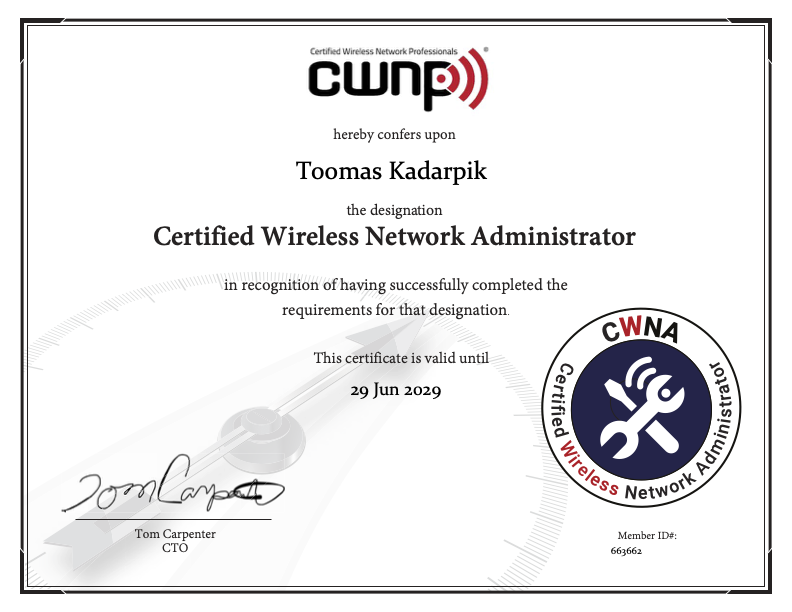
The CWNA course was quite simple and logical. Perhaps there was too much emphasis on antenna systems, which in my case is mostly primary-school-level material, since I was already actively […]
The CWNA course was quite simple and logical. Perhaps there was too much emphasis on antenna systems, which in my case is mostly primary-school-level material, since I was already actively calculating cable attenuation, antenna dBi values, and building amplifiers, receivers, and transmitters back then.
At the same time, it is good to see that the fundamental things have not been forgotten in the maze of IT. I actually passed the test straight away with a score of 90%. After that, I read the book through, but still could not get above 90%; some small mistakes still slipped in, because in the Wi-Fi field there are so many abbreviations, and you need to know the whole history as well.
Still, sometimes it is useful to know these things too.
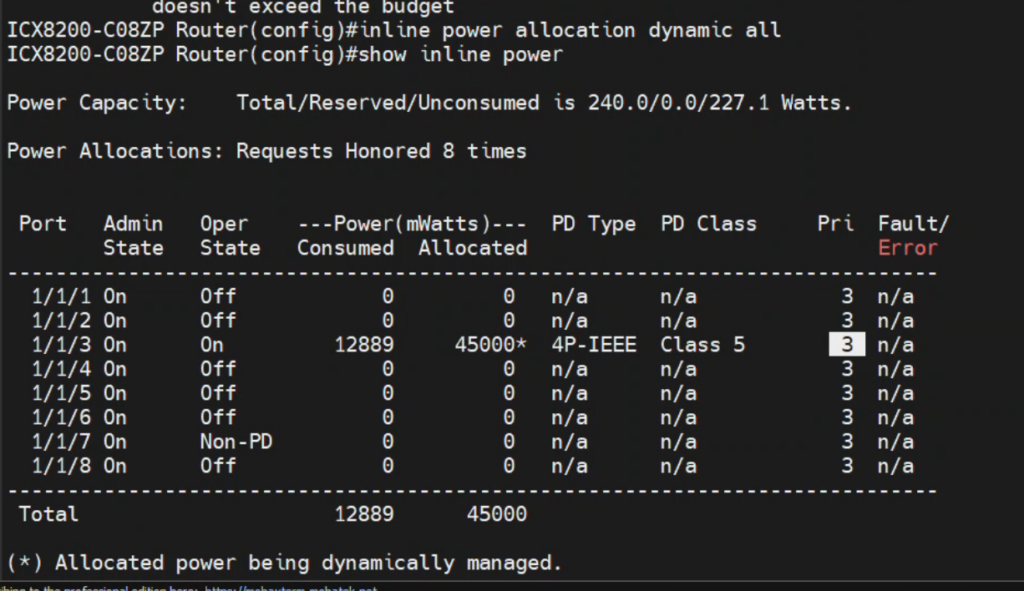
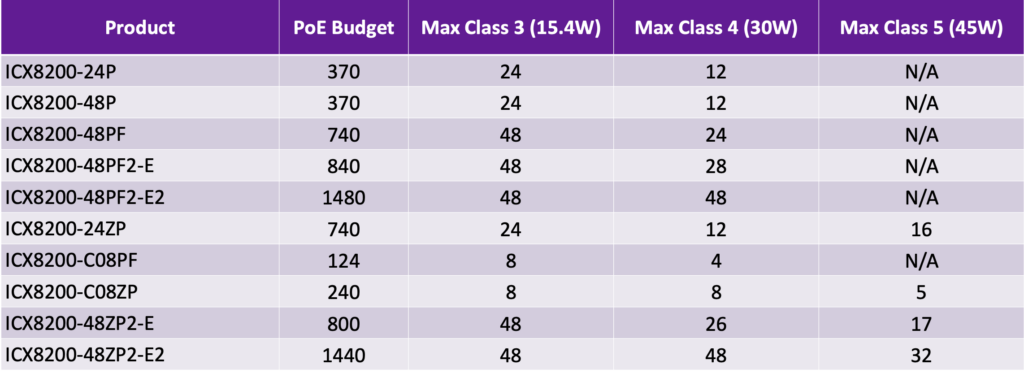
This feature allows to save PoE budget and use more devices on the same Ruckus PoE switch. Dynamic Power Allocation is supported on ICX 7550, 7650, 8100, and 8200 series […]
RUCKUS ICX Dynamic PoE power allocation
This feature allows to save PoE budget and use more devices on the same Ruckus PoE switch.
Dynamic Power Allocation is supported on ICX 7550, 7650, 8100, and 8200 series switches.
ICX8200-C08PF Router(config)#inline power allocation dynamic
Required Software Version
Switches must run software version 10.0 or higher to enable dynamic power allocation features. You can still tune the final results with inline power e 1/1/3 priority 1, this priority cancels dynamic power for specific port 1/1/3 and other ports run with dynamic power - this is called hybrid mode.
What are the major practical differences between these standards? The Wi-Fi 6 (802.11ax) 2.4/5 GHz standard introduces OFDMA modulation and data multiplexing, which means that multiple clients can communicate over […]
Wi-Fi5/6/7 2.4-6 GHz
What are the major practical differences between these standards?
The Wi-Fi 6 (802.11ax) 2.4/5 GHz standard introduces OFDMA modulation and data multiplexing, which means that multiple clients can communicate over the air at the same time. This is a very important aspect, because in Wi-Fi each packet transmission (from AP or client) usually has to wait for the air to be free (due to the mandatory CSMA/CA algorithm). This takes time and becomes resource-intensive when many clients are active simultaneously.
Therefore, you can say that in certain cases Wi-Fi 6 can be up to 10× faster simply because of its protocols. Simultaneous communication is possible in both directions, so if acknowledgements need to be sent to clients, this can be done in a single packet.
Another important aspect of Wi-Fi 6 is the use of 2.4 GHz. Until now, this was really only based on the Wi-Fi 4 standard, because Wi-Fi 5 (802.11ac) is a 5 GHz-only standard. The result is especially noticeable at home and in offices: when a client moves from 5 GHz to 2.4 GHz at the edge of coverage, the network is still usable, assuming similar channel spacing and noise floor, which is typically the case in detached houses and, for example, warehouses with sheet-metal walls.
For instance, if you have Wi-Fi calling enabled on your mobile phone, where all calls and SMS messages go over Wi-Fi instead of the outdoor mobile network, you often won’t even notice that the call is happening over a 2.4 GHz channel, because the phone’s bandwidth needs during a call are small.
There are other good technical aspects as well, such as increasing the symbol duration to 12.8 microseconds. In addition, the guard interval (GI) has been increased up to 3.2 microseconds. This significantly improves tolerance to multipath fading and therefore greatly improves indoor coverage quality. Often, the actual throughput at the edge of the coverage area is up to 10× higher than with Wi-Fi 5. If you add wide channels on top of that, this kind of quality-improving feature becomes extremely important.
Energy saving has also improved. TWT (Target Wake Time) can in fact be tuned to spans of days, so IoT clients do not have to stay connected to the network all the time and their batteries last much longer. In practice, the behaviour of a normal smartphone also changes when, at home or in the office, it performs all its activities over Wi-Fi (with Wi-Fi calling enabled).
What happens with the Wi-Fi 7 standard (2.4/5/6 GHz), whose quality adoption has been very slow? First, this standard includes all three frequency bands. In Europe, the lower 6 GHz band with 500 MHz of spectrum is allowed. Second, all frequencies and radios are used for communication simultaneously, so traditional roaming between 2.4 and 5 GHz is no longer necessary. All channels can be used at the same time and data can even be sent in different directions (full duplex).
An important aspect is also the ability to cut out parts of the spectrum from use on a wide channel (for example, 320 MHz) – so-called channel puncturing. This makes it possible to continue using a wide channel even if part of it is affected by interference.
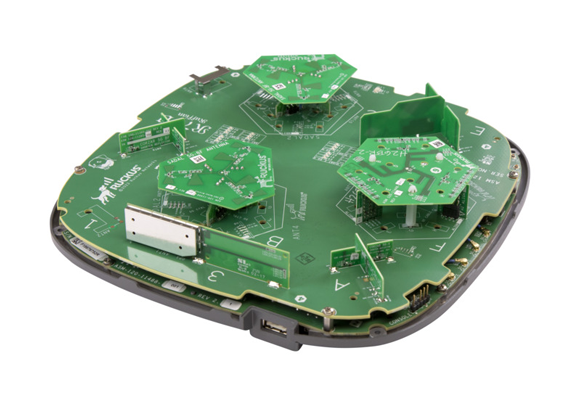
With Wi-Fi 7, most devices operate on 2.4 and 5 GHz at the same time. Especially in Europe, simultaneous operation on 5/6 GHz is quite a demanding RF design task. So far, the only truly linear Wi-Fi devices on the market have been in the Ruckus R670/R750 class, which can even use two channels in the 5 GHz band simultaneously with good quality.
Ruckus has released a new software called Unleashed 200.13, which is a controller and management software that works on Ruckus' regular Wi-Fi access points. Today's APs are already so fast […]
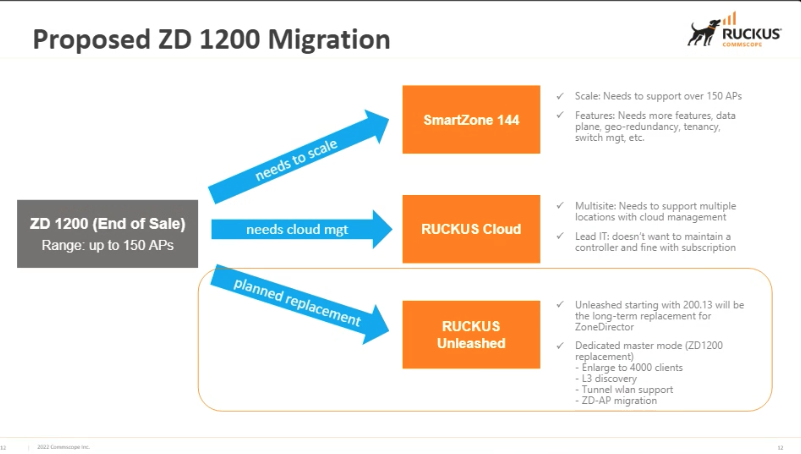
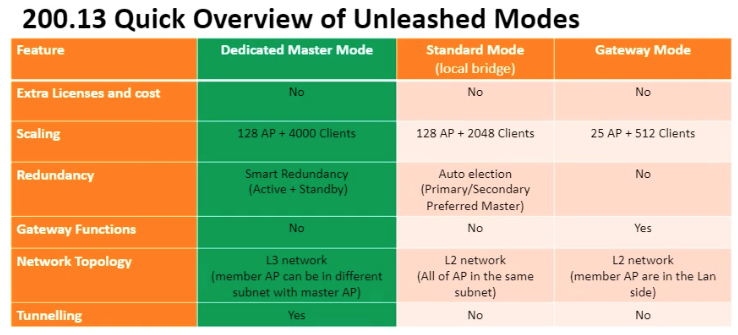
Ruckus has released a new software called Unleashed 200.13, which is a controller and management software that works on Ruckus' regular Wi-Fi access points. Today's APs are already so fast that the R750 can now fully replace the ZoneDirector controller. As a result, the system can support up to 128 APs and up to 4000 Wi-Fi clients connected at the same time.
Dedicated controller AP is a new concept in Unleashed, which brings ZoneDirector features such as SSID tunneling, L3 management, etc. The dedicated controller AP must be either R750 or R850 and it is recommended to have a duplicate for redundancy, similar to the ZoneDirector solution.
What new ?
Unleashed 200.13 is officially a replacement product for ZD1200.
Features of Unleashed 200.13 include:
Dedicated R750/850 AP
Automatic discovery of L3 devices, similar to ZD
Use of L3 tunnels for SSID traffic
Intelligent controller backup using dedicated APs
Automated migration from ZD to Unleashed
Rate limit increased to 500Mb/s
Improved DPSK WPA key management
Ability to create read-only admin accounts.
And most important, Unleashed network does not require Ruckus licenses!!! The only necessary condition is to ensure proper power and network connectivity for the controller AP, which could be located near the server room or distribution point and connected to UPS power.
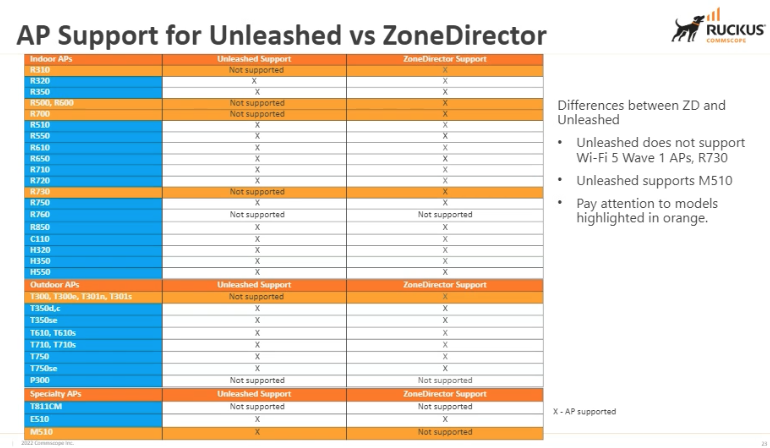
Of course, the AP support is not at the same level as with Smartzone 6.1.1 version, which even supports R500 and older APs, but all newer WiFi5 Wave2 generation APs are supported.
Ruckus Smartzone 6.1.1 has already received a new user interface for version 6.0, which systematizes the features accumulated over the years into a clearer selection, providing search and placing bookmarks […]
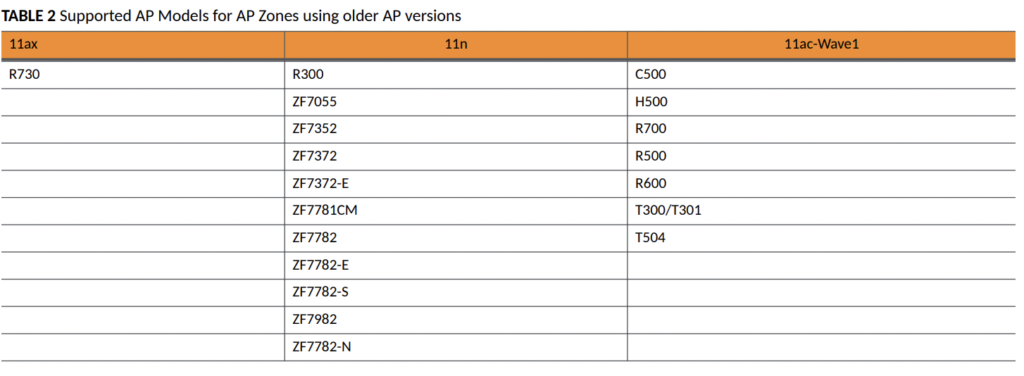
Ruckus Smartzone 6.1.1 supports large selection of end of life AP-s.
Ruckus Smartzone 6.1.1 has already received a new user interface for version 6.0, which systematizes the features accumulated over the years into a clearer selection, providing search and placing bookmarks on the desktop. Different menus can also be searched now.
The best update from 6.0 is also Linkedin, Google, Facebook, Microsoft social media-based login, now you don't need a separate server for that.
The biggest update is here !!! 6.1.1 supports a very wide range of Ruckus APs of different generations, many of which are more than 5 years old and long out of production. If the network serves a warehouse or an industrial company, we have seen the viability of even 12 year old Ruckus devices, because the actual speed requirements are much lower than what the 11n standard provides. But at the same time, internet connections today are still slower than the latest 11ax Wi-Fi6 offers, so old APs are often enough for many places.
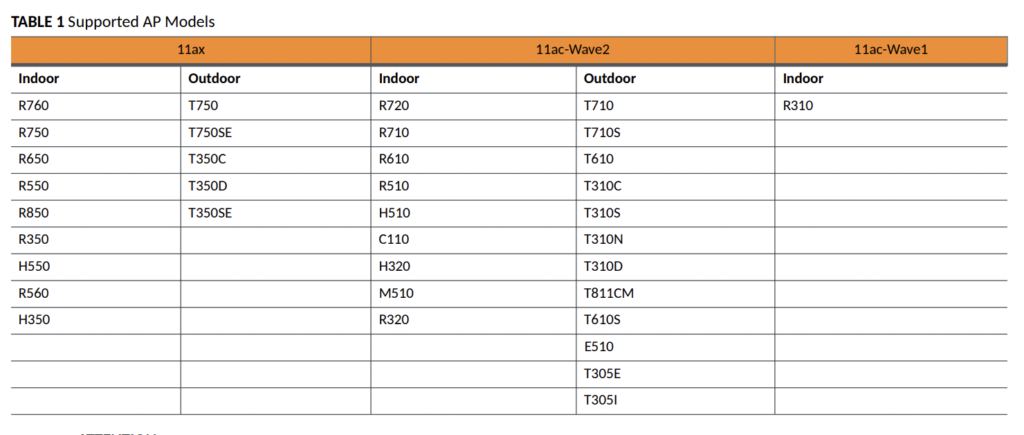
Modern Wi-Fi6 and Wi-Fi5 Wave2 AP-s:
The following end of life AP-s can be used in separate Zone, no WPA3 is supported for old AP-s.
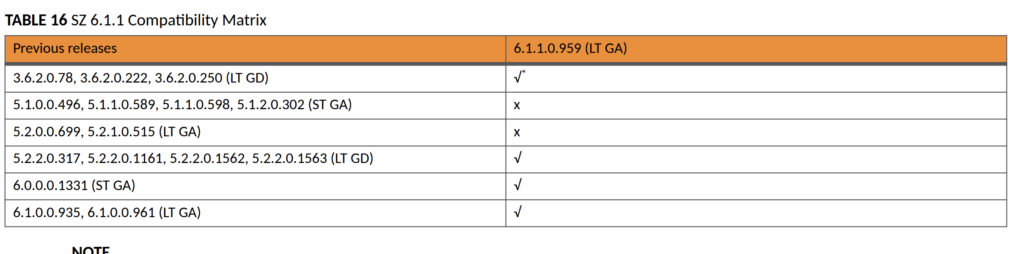
How old v3 AP firmwares are supported:
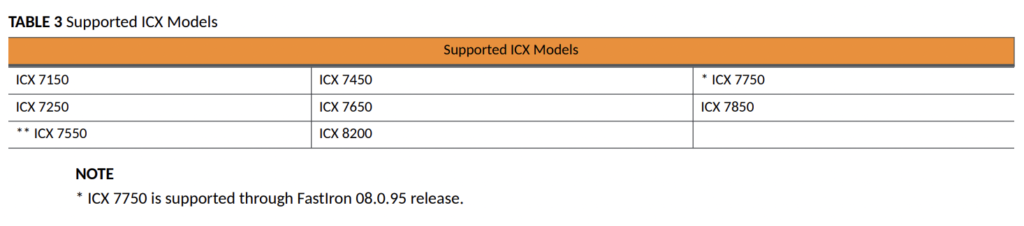
Ruckus ICX L2/L3 switches are also supported and managed by Smartzone
his is short video in estonian showing new look of Smartzone 6.0 GUI.
Ruckuse switchides saab kasutada nii switchi kui ruuteri tarkvara, firmware nimetustes on alguse lühendis vahe näha SPS ja SPR vastavalt. Ruckus ICX family has two separate firmwares, SPS for plain […]
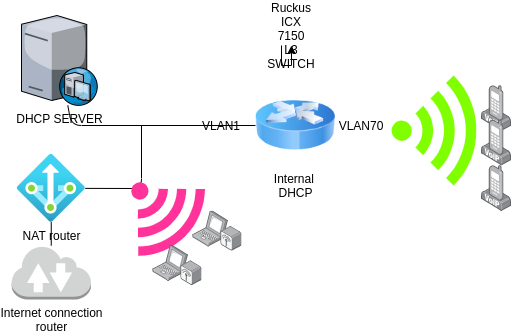
Example use case of using L3 routing in Ruckus ICX switches.
Ruckuse switchides saab kasutada nii switchi kui ruuteri tarkvara, firmware nimetustes on alguse lühendis vahe näha SPS ja SPR vastavalt.
Ruckus ICX family has two separate firmwares, SPS for plain VLAN switch and SPR for routing with various routing protocols, like OSPF, RIP etc.
The simplest goal of a route/switch may be to divide a large network into two L2 separate networks and to create a DHCP service using a switch. This solution significantly increases reliability and also simplifies the diagnosis of errors.
This example is from life itself, where part of the devices (VLAN70) had to work reliably and the rest of the network was unmanageable and consisted of random components (VLAN1). Int this case, only static routing is used.
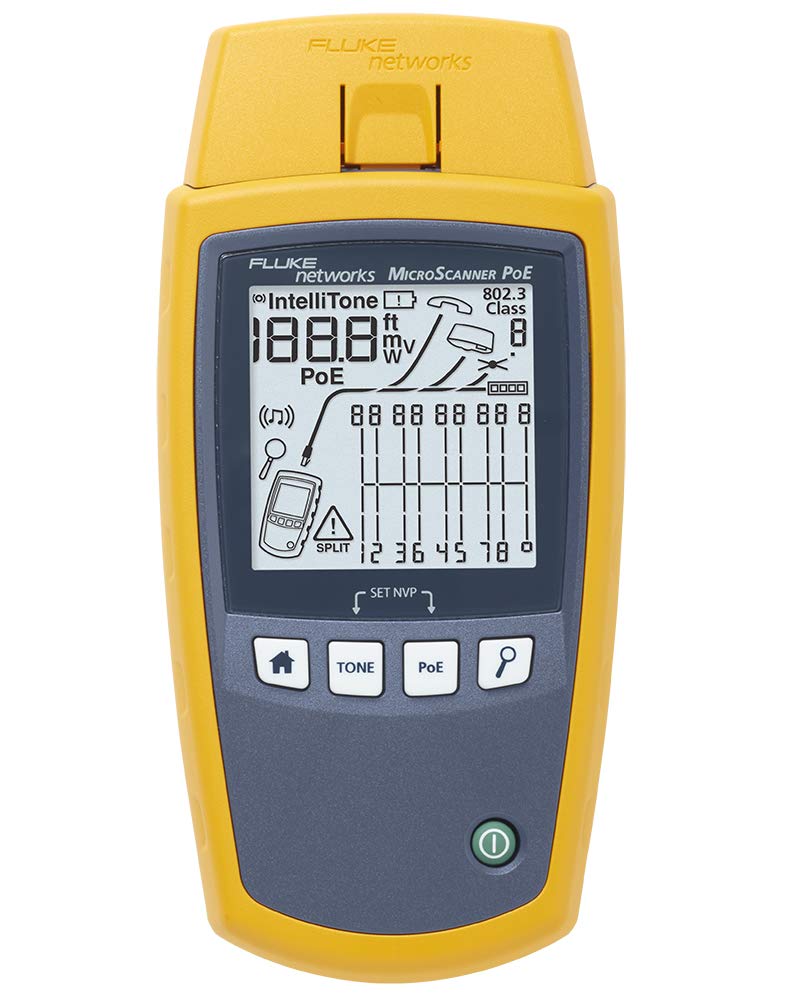
Other PoE+ articles in this site https://blog.3kgroup.ee:443/tag/poe/ Soetasime lisaks kahele Fluke Cable IQ testrile endale ka Fluke Networks MS-POE MicroScanner POE Cable Verifier testri , mis võimaldab 10 Gb/s juurs […]
Better POE testing know-how and service for our partners.
Soetasime lisaks kahele Fluke Cable IQ testrile endale ka Fluke Networks MS-POE MicroScanner POE Cable Verifier testri , mis võimaldab 10 Gb/s juurs kuni 90W PoEh totiestandardite testimist testimist.
We have now Fluke Networks MS-POE MicroScanner POE Cable Verifier tester to provide better know-how and services to our reseller partners. The tester allows to test up to 10 Gb/s connections and PoE power up to PoEh 90W class 7.
Wi-Fi 6 standard has inceased power consumtion and precise testing of cables and switch port configuration is even more important than before. It also requires better cabling and connector solution to tolerate larger currents.
Many Ruckus AP-s work in different modes depending on PoE power class, testing and know-how allows to chose optimal configuration.
There's a very useful function in SmartZone - you can ssh to any connected and online AP from SmartZone cli. Example: executing one command: Go to SmartZone cli through ssh, […]
SmartZone AP remote-cli and scripting.
There's a very useful function in SmartZone - you can ssh to any connected and online AP from SmartZone cli.
Example: executing one command:
Go to SmartZone cli through ssh, go to admin mode with 'ena' and give a command in following way:
remote ap-cli c8:03:f5:0E:06:c0 "get scg ip"
------ SCG Information ------
 SCG Service is enabled.
 AP is managed by SCG.
 State: RUN_STATE
 Server List: 10.0.12.140,194.204.45.210
 SSH tunnel connected to 194.204.45.210
 Failover List: Not found
 Failover Max Retry: 2
 DHCP Opt43 Code: 6
 Server List from DHCP (Opt43/Opt52): Not found
 SCG default URL: RuckusController
 SCG config|heartbeat intervals: 30|30
 SCG gwloss|serverloss timeouts: 7200|36000
OK
This shows the command is executed in AP and the result is sent to SmartZone cli.
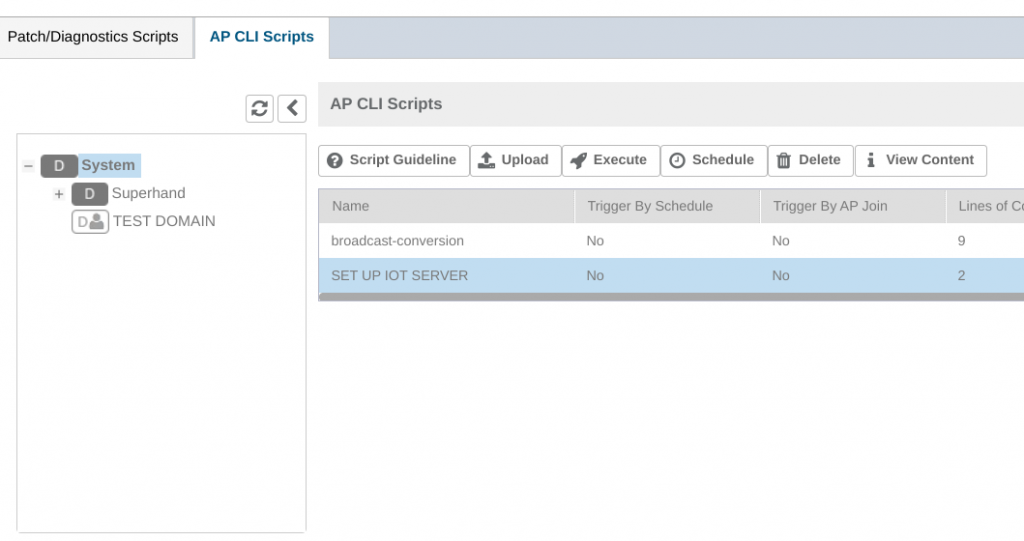
A sciprt can be executed at once in many AP's and it's done from SmartZone WebGUI. Go to Diagnostics->Scripts->AP CLI Scripts. This function allows to execute a script on one domain with possibility to time it on a convenient moment.
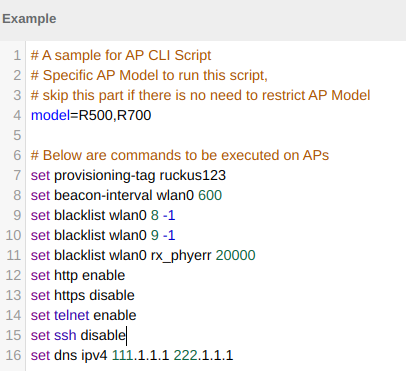
Script can limit the commands to specific AP models or specify other limitations:
Take notice, that there's a default blacklist of commands you are not allowed to use in a script to prevent the more riskier actions of changing controller ip for example.
Since SmartZone 5.1 the following commands are not allowed in scripts:
reboot
set factory
set scg reset
set scg init
set scg ip
set scg disable/enable
set hub disable/enable
set interface
set password
set login
In case of still needing those commands, please contact Ruckus support to help you with special privileges.
CommScope is excited to announce the launch of our new IoT Technology Specialization, recognizing Solution Providers with expertise in selling, deploying and supporting RUCKUS IoT. This specialization can be added to your existing CommScope […]
CommScope RUCKUS new IoT Specialization partner program.
CommScope is excited to announce the launch of our new IoT Technology Specialization, recognizing Solution Providers with expertise in selling, deploying and supporting RUCKUS IoT. This specialization can be added to your existing CommScope PartnerPRO Network level to showcase your abilities in delivering IoT solutions.
The RUCKUS IoT Technology Specialization offers benefits including a specialist badge, prioritized allocation of qualified IoT leads, proposal based MDF, and visibility on the partner locator.
Additionally, specialists will have access to the RUCKUS IoT Demo-in-a-Box for use at industry events or in-office demonstrations and will be able to participate in the IoT Exclusive Access Forum.
To become an IoT Specialist, Solution Providers must complete an IoT Discovery questionnaire, remain compliant with the standard Solution Provider training requirements, and take IoT Sales and Technical online trainings. CommScope's RUCKUS IoT team will also verify your IoT equipment set-up to ensure your success in selling IoT solutions.
Reach out to your account manager or RuckusChannel@commscope.com with any questions or inquiries on this new specialization.
Dear Valued CommScope – Ruckus Networks Value Add Distributor Partner! We invite you to our CommScope 2020 EMEA Virtual Roadshow. Industries are fast embracing a new era of robotics, artificial […]
CommScope 2020 EMEA Virtual Roadshow! (2 x 3 hours on 25th and 26th November 2020)
Dear Valued CommScope – Ruckus Networks Value Add Distributor Partner!
We invite you to our CommScope 2020 EMEA Virtual Roadshow.
Industries are fast embracing a new era of robotics, artificial intelligence (AI), the Internet of things (IoT) and other innovations that will impact all of our lives. With these new tools, enterprises are finding it harder, not easier, to evolve along with these new technologies.
Whether wired, Wi-Fi, cellular or any combination, your network should always be simple, reliable and adaptable. CommScope can show you how to do it—while delivering exceptional customer service every step of the way.
9am GMT, 10am CET, 1pm GST November 25 - November 26, 2020
You’ll learn about the digital transformation trends of 2020 and the years ahead, as well as their opportunities and challenges. You’ll also see how CommScope solutions and expertise can provide a comprehensive network solution, operating on a single framework, managed with the help of intelligent tools and analytics, on-premise or in the cloud.
When interested please register via this link. The Agenda for these 2 morning sessions can be found below. Feel free to share this invite with your colleagues concerned.